 DayZ Companion
 DayZ Companion tool
Gamma settings for DayZ
Adjust gamma for comfortable nighttime gameplay.
Choose a moderate setting and check that detail stays visible and text is easy to read.
Features
Adjusts image tones
Gamma changes how image midtones are displayed.
Provides a control in Companion
Adjust the setting in the control centre and preview the result.
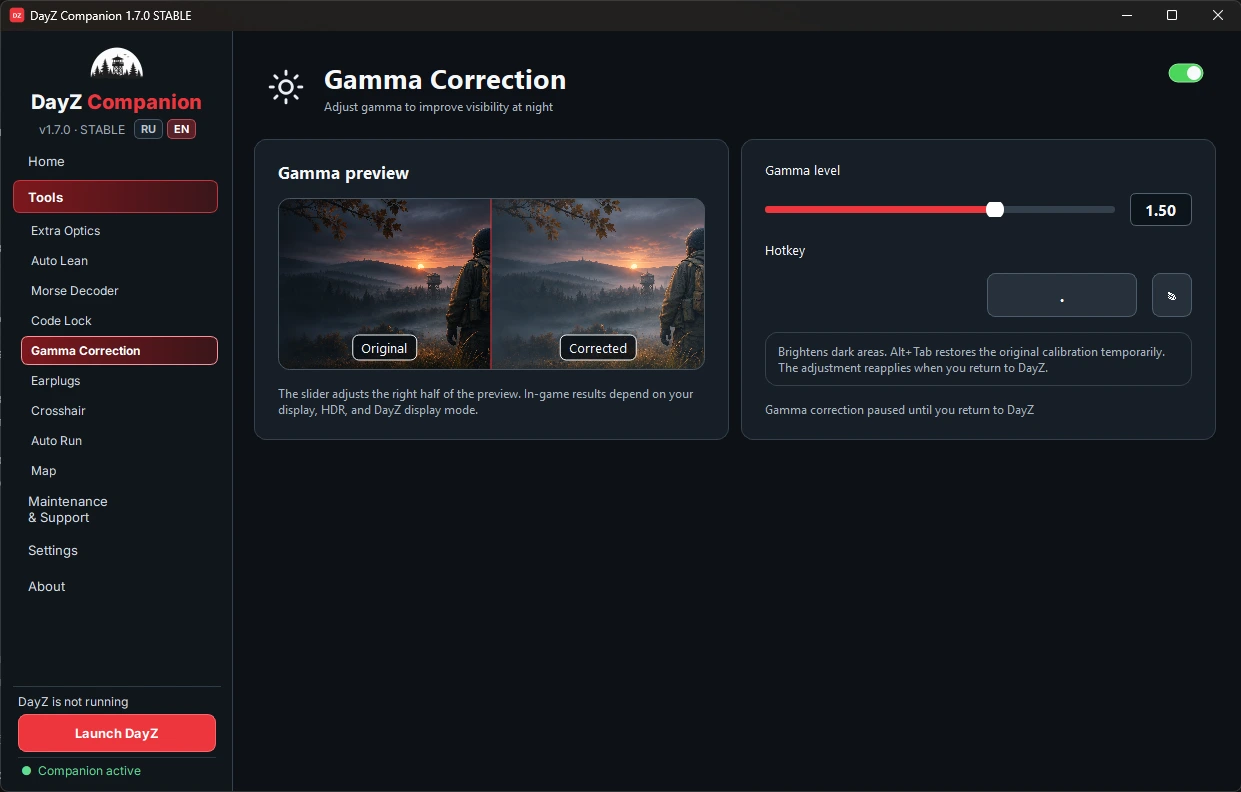
Companion interface
Open the screenshot to take a closer look at the interface.
How to adjust gamma
Open Gamma
Select the tool in the control centre and enable the module.
Adjust the setting
Set gamma between 1.10 and 1.70 and check the preview.
Apply correction in-game
Return to the focused DayZ window and enable correction with the assigned hotkey.
Frequently asked questions
Why can’t I see a change?
The preview does not change system gamma. Enable correction with the assigned hotkey while DayZ is focused. If there is no effect, check the status message, HDR/SDR, graphics driver and game display mode.
What happens when I switch away from the game?
Companion restores the original gamma when DayZ loses focus. When you return, it automatically attempts to resume correction.
How does gamma work?
Companion uses Windows system gamma correction. This changes image midtones, not backlight brightness.


Download DayZ Companion
Find the current build and first-run instructions on the download page.